AI Image Generators for Small Business Social Media
AI image generators are changing the way small businesses create social media content. These tools save time and money by producing professional visuals in minutes – no design skills needed. With 71% of social media marketers already using AI tools and posts with images generating 650% more engagement, it’s clear that visuals are essential for standing out online.
Key takeaways:
- Why it matters: High-quality visuals build trust, boost engagement, and drive sales.
- Challenges solved: Traditional design is expensive and time-consuming. AI tools simplify the process.
- Top tools: Canva AI, DALL·E 3, Midjourney, Adobe Firefly, Leonardo.Ai, and Ideogram 3.0 cater to different needs like templates, artistic visuals, or commercial safety.
- Costs: Plans start as low as $5/month, making it affordable for small businesses.
- How to use them: Write detailed prompts, batch-create images, and ensure proper sizing for platforms like Instagram, TikTok, and LinkedIn.
AI tools are a game-changer for businesses looking to maintain an active and polished online presence without breaking the bank.
Generate Commercially Safe AI Images for Content Creators
Why Small Businesses Need Visual Content on Social Media
Visual content isn’t just a nice-to-have; it’s a game-changer. Posts with images generate 650% more engagement than those with just text. In a world where people scroll through social media for over two hours daily, a striking image can grab their attention and make them pause long enough to hear what you have to say.
For small businesses, visuals go beyond just racking up likes – they help build brand recognition and trust. A polished feed with high-quality images shows professionalism and care. On the flip side, a page cluttered with outdated or low-quality visuals might make potential customers question whether you’re even still in business. Laura Moss, Cofounder of Adventure Cats, highlights the importance of visuals:
"Social media is our second-biggest driver of sales. Most customers say they discover us on Instagram".
For her business, visuals act as a storefront, shaping first impressions and driving sales. This is where AI image generators can make a real difference.
The Struggles of Traditional Content Creation
Most small business owners juggle endless responsibilities – serving customers, managing inventory, and handling day-to-day operations. Social media often takes a backseat, leading to inconsistent posting. You might post regularly for a while, then disappear when things get busy. This "feast-or-famine" cycle can hurt your online presence.
AI image generators offer a solution. Instead of spending hours in design software or hiring expensive freelancers, you can create professional-looking graphics in minutes. Take the example of Danni Eickenhorst, co-owner of Steve’s Hot Dogs in St. Louis. In 2020, she used targeted visuals on Facebook to promote a restaurant event. The results? Her campaign reached 28,100 people, added 150 page likes, gained 75 Instagram followers, and tripled typical Saturday sales.
The Growing Role of AI in Social Media
The numbers speak for themselves: 71% of social media marketers already use AI tools in their workflow. And this trend is only growing. The market for AI-powered social media tools is expected to reach $12 billion by 2031. What used to require a full team of marketers can now be handled by a single business owner armed with the right tools. This not only saves time but also ensures your social media presence stays sharp and engaging, allowing you to focus on running your business.
What to Look for in AI Image Generators
For small businesses that need professional social media content fast, picking the right AI image generator is crucial. These tools vary widely – some are built for artists seeking creative freedom, while others are tailored for businesses needing polished results with minimal effort. If you’re running a small business, you likely don’t have time to master complex software or deal with legal headaches. Here’s what truly matters.
Simple Interface and Low Learning Curve
Time is money, and as a business owner, you need tools that deliver results without a steep learning curve. Look for platforms with user-friendly features like sliders, dropdown menus, and presets. Shady Shae, a YouTube artist, highlights this point when discussing Picmaker:
"I like Picmaker’s ease of use. And the graphics come out so nicely. I get my designs done in 5 minutes".
Tools that guide users through the process with conversational interfaces or step-by-step instructions are especially helpful for beginners.
Brand Customization Options
Your social media visuals should reflect your brand, not just generic templates. Tools offering Brand Kits – where you can save your logos, fonts, and brand colors – help keep your content consistent. Even better are platforms like Sivi, which provide layered, editable files instead of static images. This flexibility allows you to fine-tune elements like logo size or text placement. Pradeep Soundararajan, Founder and CEO of Bugasura.io, emphasizes the importance:
"This is transformational for our GTM to help us quickly have multiple options in design for our messaging".
Consistency is key to brand recognition. Your audience should recognize your posts at a glance, even before seeing your name. Once your visuals align with your brand, double-check legal guidelines to avoid potential issues.
Commercial Use Rights
Not all AI-generated images are cleared for business use. Some tools require a paid subscription to grant commercial rights. For instance, Midjourney’s free tier doesn’t include commercial usage – you’ll need at least the Basic Plan at $10/month. Adobe Firefly, on the other hand, ensures its content is safe for commercial use by training exclusively on licensed Adobe Stock images and public domain material. Adobe explains:
"Trained on Adobe Stock images, openly licensed content, and public domain content, Firefly is designed to be safe for commercial use".
Before using any generated image commercially, review the tool’s terms. Free tiers often lack commercial rights or include watermarks, which can hurt your professional image. Also, keep in mind that even with commercial rights, you likely won’t have exclusive ownership, meaning others could create similar images using the same tool.
Best AI Image Generators for Small Business Social Media
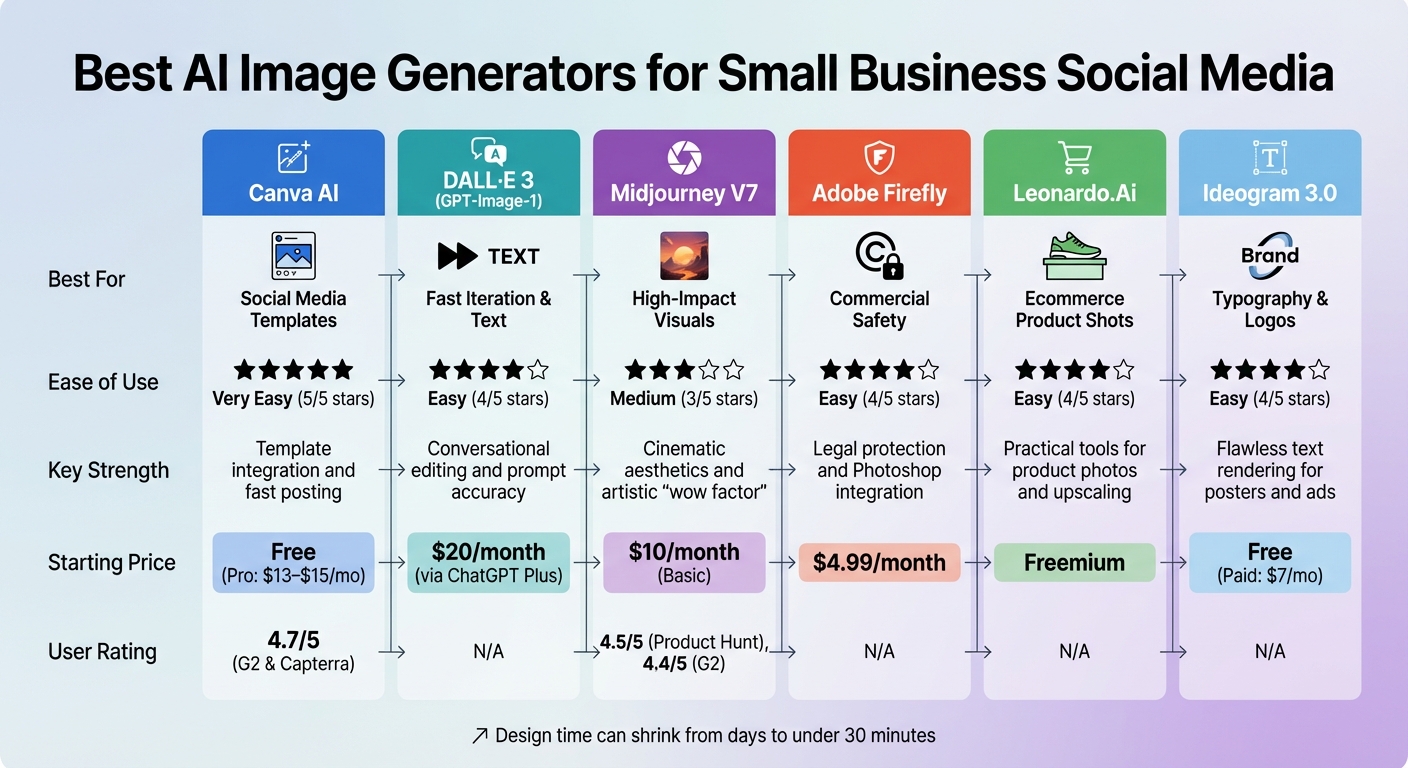
AI Image Generator Comparison for Small Business Social Media
Now that you know which features to prioritize, let’s dive into the tools that deliver. AI image generators have made huge strides, with each excelling in specific areas. Some focus on speed and templates, while others specialize in artistic visuals or legal safeguards. The best tool for you depends on your business needs, the platforms you use, and how much creative control you want.
Feature Comparison Table
Here’s a breakdown of the top tools for small business social media:
| Tool | Best For | Ease of Use | Key Strength | Starting Price |
|---|---|---|---|---|
| Canva AI | Social Media Templates | Very Easy | Template integration and fast posting | Free; Pro at $13–$15/month |
| DALL·E 3 (GPT-Image-1) | Fast Iteration & Text | Easy | Conversational editing and prompt accuracy | $20/month via ChatGPT Plus |
| Midjourney V7 | High-Impact Visuals | Medium | Cinematic aesthetics and artistic "wow factor" | $10/month (Basic) |
| Adobe Firefly | Commercial Safety | Easy | Legal protection and Photoshop integration | $4.99/month standalone |
| Leonardo.Ai | Ecommerce Product Shots | Easy | Practical tools for product photos and upscaling | Freemium |
| Ideogram 3.0 | Typography & Logos | Easy | Flawless text rendering for posters and ads | Free; paid from $7/month |
With these tools, design time can shrink from days to under 30 minutes, helping you launch campaigns fast. Let’s explore what makes each one stand out.
Strengths and Best Uses for Each Tool
Canva AI is perfect for small business owners or marketers who want quick, polished content without design expertise. Its Magic Media feature lets you create images directly within a template, making it a go-to for platforms like Facebook and Instagram, where posting frequency matters. Users rate it highly, with 4.7/5 on both G2 and Capterra.
DALL·E 3, available through ChatGPT Plus, excels in text-based editing and ease of use. You can tweak images using simple commands like “make the logo bigger” or “add a sunset,” eliminating the need for complicated prompts. This makes it ideal for quick ad testing or refining creative ideas on the fly.
Midjourney V7 is your tool for jaw-dropping visuals. It runs on Discord and has a learning curve, but the results are worth it. Its Default Personalization feature, launched in April 2025, adapts to your aesthetic preferences after you rate about 100 images. With ratings of 4.5/5 on Product Hunt and 4.4/5 on G2, it’s a favorite for creating high-impact visuals.
Adobe Firefly stands out for businesses where legal safety is critical. It’s trained on licensed Adobe Stock and public domain content, offering IP indemnity for enterprise users. For brands running paid ads or working with corporate clients, its legal safeguards make it worth the $4.99–$9.99/month price tag.
Leonardo.Ai specializes in ecommerce visuals. It’s great for product shots with clean backgrounds, lifestyle images, and upscaling. This tool is especially useful for online stores targeting Instagram and Facebook audiences. Its freemium model means you can test it out before committing to a paid plan.
Ideogram 3.0 solves the problem of rendering text in images, making it a top choice for logos, posters, and social graphics. Whether you’re creating content for LinkedIn or professional ads, it ensures text clarity and starts at just $7/month.
For the best results, combine tools. Use Midjourney for stunning visuals, DALL·E for quick iterations, or Firefly for legal peace of mind, then refine your images with editors like Canva or Photoshop.
sbb-itb-d544328
How to Create Better Social Media Images with AI
Using AI tools effectively goes beyond just picking the right one. The real magic lies in how you use these tools. Many business owners treat AI generators like search engines, but they work best when approached as creative collaborators. The quality of what you get depends heavily on the quality of what you put in. Mastering a few techniques can save you hours and significantly improve your results.
Writing Clear Prompts
Think of a prompt as a recipe – the more detailed, the better the outcome. A strong prompt typically includes [Subject] + [Action/Pose] + [Environment] + [Style] + [Lighting] + [Technical Details]. For instance, specifying details like "modern interior, soft lighting, 4K resolution" can lead to far better results than vague descriptions.
Different AI tools respond to prompts in unique ways:
- ChatGPT (GPT-5): Works well with detailed, conversational prompts like "add a sunset" or "make the logo bigger".
- Midjourney V7: Prefers short, focused phrases and reference images.
- Stable Diffusion 3.5: Excels with structured keywords and supports negative prompts for exclusions.
- Ideogram: Ideal for text-heavy designs like posters, ensuring accurate typography.
When writing prompts, use specific nouns like “headphones” instead of abstract terms like “music.” Models also respond better to positive descriptions. For example, describe what you want to see rather than focusing on what to avoid. You can also include artistic styles (e.g., "minimalist" or "impressionist"), lighting (like "golden hour"), and framing (such as "close-up") to guide the AI.
"AI outputs are only as good as the quality of our prompt inputs." – Tim Krywulak, Content Strategist
Refining your results often requires tweaking one element at a time. For instance, in Midjourney, you can assign importance using double colons (::), like "blue sky::2." In Stable Diffusion, parentheses adjust weight, e.g., "(blue sky:1.5)". Always specify aspect ratios upfront to avoid awkward cropping: 1:1 for Instagram, 9:16 for TikTok/Reels, and 16:9 for YouTube.
Creating Multiple Images at Once
Once you’ve nailed your prompt, batch-generate images to streamline your content creation. Running weekly sessions to create an “Idea Bank” can provide 2–4 weeks of content in advance. This method can save 10–20 hours weekly compared to traditional design workflows.
Save your best prompts as templates. Keep elements like "Style" and "Technical Details" consistent (e.g., "minimalist, soft natural light, 4K"), and simply swap out the "Subject" to maintain a cohesive look. Mention brand colors directly in your prompt, such as "using a coral and teal color palette." Tools like Canva AI and Adobe Firefly allow you to store brand assets like fonts and logos for quick application across multiple images.
To avoid repetitive visuals, generate 3–4 batches of 4 images per prompt. Experiment with different formats for the same idea, like turning one concept into a myth-bust, a how-to, and a checklist. This keeps your content varied while sticking to a unified theme.
Sizing Images for Each Platform
After generating high-quality images, the next step is tailoring them to fit each platform’s dimensions. Incorrect sizing can lead to pixelation or awkward cropping, so always upload the highest resolution possible. Social platforms typically scale images down, but scaling up low-resolution images can distort them.
| Platform | Square Format | Vertical Post | Stories / Reels |
|---|---|---|---|
| 1080 x 1080 px | 1080 x 1350 px | 1080 x 1920 px | |
| 1080 x 1080 px | 1080 x 1350 px | 1080 x 1920 px | |
| 1200 x 1200 px | 1080 x 1350 px | N/A | |
| TikTok | 640 x 640 px (Ads) | 1080 x 1920 px | 1080 x 1920 px |
| 1000 x 1000 px | 1000 x 1500 px (2:3) | 1080 x 1920 px |
For images with logos or text, use PNG to avoid compression issues, while JPG works better for photographs. When designing for Stories or Reels (1080 x 1920), keep key elements away from the top 14% and bottom 20–35% to avoid interference from UI overlays. For non-square posts, ensure the most critical visuals are centered in the 1:1 area to maintain visibility on profile grids.
Tools like Canva’s "Magic Resize" and Adobe Firefly can automatically adjust designs to fit multiple dimensions without compromising quality. AI generators like ChatGPT and Ideogram typically produce images at 1024 x 1024 px, while Midjourney’s upscaler can reach 2048 px. For large-scale printing, tools like LetsEnhance can upscale images to as much as 512 megapixels.
Understanding Licensing and Copyright Rules
Before using AI-generated images on your business’s social media, it’s essential to confirm your commercial usage rights. These rights allow you to use images for activities like selling products or running advertisements, unlike personal or non-commercial licenses, which restrict profit-driven uses. Legal compliance isn’t just a formality – it’s critical to protect your business. Copyright infringement penalties can reach up to $150,000 per violation and $30,000 per image. To avoid these risks, start by examining the specific terms outlined by your AI tool.
Carefully review the Terms of Service for the AI tool you’re using. Look for terms like "commercial", "merchandise", "reprint", or "advertising" to clarify what’s allowed. For example, OpenAI explicitly states that users own the rights to their ChatGPT outputs, including the ability to reprint, sell, or merchandise them. However, not all platforms are this straightforward. If the terms are unclear, reach out to the provider and request written confirmation of your commercial rights.
Be cautious of "Editorial Use" restrictions. These limit the image’s use to news or educational purposes and prohibit commercial activities like advertising or product sales. Such restrictions often apply to images featuring identifiable people or private property without proper releases. Additionally, avoid Creative Commons licenses marked with a "NonCommercial (NC)" tag. For business purposes, the safest option is Creative Commons Zero (CC0), which allows unrestricted use and modification without attribution.
Documenting your process is another critical step. Keep records of the image source, license terms, URL, and download date. This can serve as evidence of due diligence if legal issues arise. To further protect your business, use reverse image search tools like TinEye or Google Reverse Image Search to confirm the AI hasn’t accidentally generated an image too similar to an existing copyrighted work. And remember, attribution alone doesn’t grant permission – crediting a source won’t shield you from copyright claims.
"There is bad information out there that tells business owners… they can use anything they find on the internet as long as they give an attribution and a link back to the original. That’s wrong." – Ruth Carter, Internet Attorney
Conclusion
AI image generators have transformed how small businesses approach social media visuals, making it possible to create professional-quality designs in just minutes. No need for advanced design expertise or hefty budgets – this technology is reshaping the landscape. With 71% of social media marketers already using AI tools in their workflows, these tools are fast becoming a go-to resource.
The key is finding the right tool for your business. Whether you prioritize artistic creativity, commercial safety, or platform-specific optimization, there’s likely an option that fits your needs. Many tools even offer free trials or affordable plans starting at just $5–$8 per month, making it easy to explore without a big financial risk.
But here’s the thing: AI shines brightest when paired with human guidance. As PostQuickAI wisely notes:
"human direction + AI acceleration + human QA"
Leverage AI to speed up your content creation, but always take the time to review and ensure your visuals align with your brand’s identity.
To get started, focus on the platform where your audience is most active. Build a consistent posting routine that supports your overall strategy. Tim Eisenhauer, founder of Kokotree, shared his approach:
"I needed to stop doing social media entirely while still having social media happen"
FAQs
How can AI image generators help small businesses save time and cut costs?
AI image generators make it possible for small businesses to produce high-quality visuals in just minutes, all from straightforward text prompts. This means businesses can skip hiring graphic designers or paying for pricey stock photos, cutting costs while still creating attention-grabbing visuals.
These tools also streamline the design process, potentially saving business owners 10–20 hours per week on creating content. That extra time can be redirected toward more pressing tasks, like building their brand or connecting with customers.
What factors should small businesses consider when choosing an AI image generator?
When choosing an AI image generator, there are a few important factors small businesses should keep in mind to find the best fit for their needs.
High-quality visuals and variety are essential. You’ll want a tool that can consistently create sharp, high-resolution images that match your brand’s style. This is especially important for marketing materials and social media posts where appearance matters most.
Another key factor is ease of use. Opt for a generator with an intuitive interface that lets you create and customize images through simple prompts. Even if you’re not a designer, the process should feel straightforward and accessible.
Don’t forget to weigh cost against features. Some tools come with free plans, though they might have limited capabilities. Others offer premium features like advanced editing or additional image options for a fee. Make sure you’re getting the functionality you need within your budget.
Lastly, consider social media compatibility and workflow integration. Tools that work seamlessly with platforms like Instagram or Facebook – and even integrate with scheduling software – can streamline your content creation process. This not only saves time but also helps you maintain a consistent online presence.
What legal issues should small businesses consider when using AI-generated images for social media?
Using AI-generated images for commercial purposes, such as on social media, comes with some legal factors to consider. Copyright ownership can be a gray area, often influenced by the platform used and the level of human involvement in creating the image. Additionally, licensing terms differ across AI tools, so it’s crucial to thoroughly review the terms of service for the platform you’re working with.
To steer clear of legal complications, make sure the images are licensed for commercial use and adhere to copyright laws. If there’s any uncertainty, seeking guidance from a legal professional can help you navigate these challenges and ensure you’re using AI-generated images responsibly and securely for your business.