


How to Sell AI-Generated Logos Online
AI tools like Midjourney, DALL-E 3, and Leonardo AI have made it possible for anyone to create professional logos in minutes. With platforms like Etsy, Fiverr, and Gumroad, you can turn these designs into a profitable business. Here’s what you need to know:
- Logo Demand: Logos are crucial for businesses, with small businesses often spending $500+ on designs.
- AI Tools: Platforms like Looka, Canva, and Tailor Brands simplify logo creation with minimal cost.
- Where to Sell: Use Etsy for passive income (digital downloads), Fiverr for custom services, or Gumroad for direct sales.
- Pricing: Start with $10–$15 for single logos and $37–$67 for bundles. Offer add-ons like vector files to boost earnings.
- Marketing: Showcase designs on Instagram, Pinterest, and a portfolio website. Engage with small business communities on Facebook or LinkedIn.
Selling AI-generated logos is a low-cost, high-margin opportunity. Start small, refine your strategy, and scale as you gain experience.
Earn $500 / Day Selling Ai Logos – Full Ai Logo Design Tutorial
How to Create AI-Generated Logos
Creating professional logos no longer requires design skills or expensive tools. With AI logo generators, the process is simple: provide your brand details, pick your style preferences, and let the AI do the rest. A strong logo can be the cornerstone of your online brand’s success.
Pick an AI Logo Generator
There are several AI-powered tools available, each catering to different needs and budgets:
- Looka: Trusted by over 20 million entrepreneurs, Looka offers a Brand Kit that includes logos, social media assets, and business cards. Pricing starts at around $20 for low-resolution files, while high-resolution downloads with full brand guidelines range from $65 to $80.
- Canva: Known for its freemium model, Canva provides about 20 free AI logo generations per month. Upgrading to Canva Pro (approximately $15/month) unlocks features like its Dream Lab, which lets you create logos from text prompts and fine-tune colors.
- Hatchful by Shopify: Ideal for beginners on a tight budget, Hatchful offers free high-resolution downloads, though customization options are somewhat limited.
- Brandmark: With one-time fees between $25 and $175, Brandmark includes tools like a Logo Mark evaluator to assess design quality and a Font Generator for typography pairing.
- Tailor Brands: Starting at about $10 per month, this platform goes beyond logos, offering assets like invoices and social media covers to help build your brand ecosystem.
"Unique typography in logo design is the simplest way to look professional." – Erik Pitzer, Graphic Designer, Illumine8 Marketing & PR
Design Process Step-by-Step
To get started, input key details like your company name, tagline, and industry-specific keywords. Instead of generic terms like "restaurant", use descriptive phrases like "upscale Italian bistro" to guide the AI toward more relevant designs. Then, select 2–3 color palettes (including black or white) and symbols that align with your brand’s personality.
The AI will generate multiple logo options for you to review. Choose the ones you like and use the editor to refine details – adjust spacing, swap symbols, or tweak colors. Before finalizing, test your logo at small sizes (like a favicon) and ensure it looks sharp in both black-and-white versions.
Download your finished logo in vector formats (such as SVG, EPS, or PDF) for scalability, and include PNG files with transparent backgrounds for web use. Vector files are essential for professional applications, whether you’re printing business cards or designing billboards. Many tools also include mockup features, allowing you to visualize your logo on T-shirts, business cards, or social media profiles. These scalable files make it easy to integrate your logo into your overall online strategy.
"Color is one of the most identifiable components of a visual identity, so if no competitors are using a specific color it allows you to stand out from the crowd with little effort." – Ian Paget, Founder, Logo Geek
Where to Sell AI-Generated Logos Online
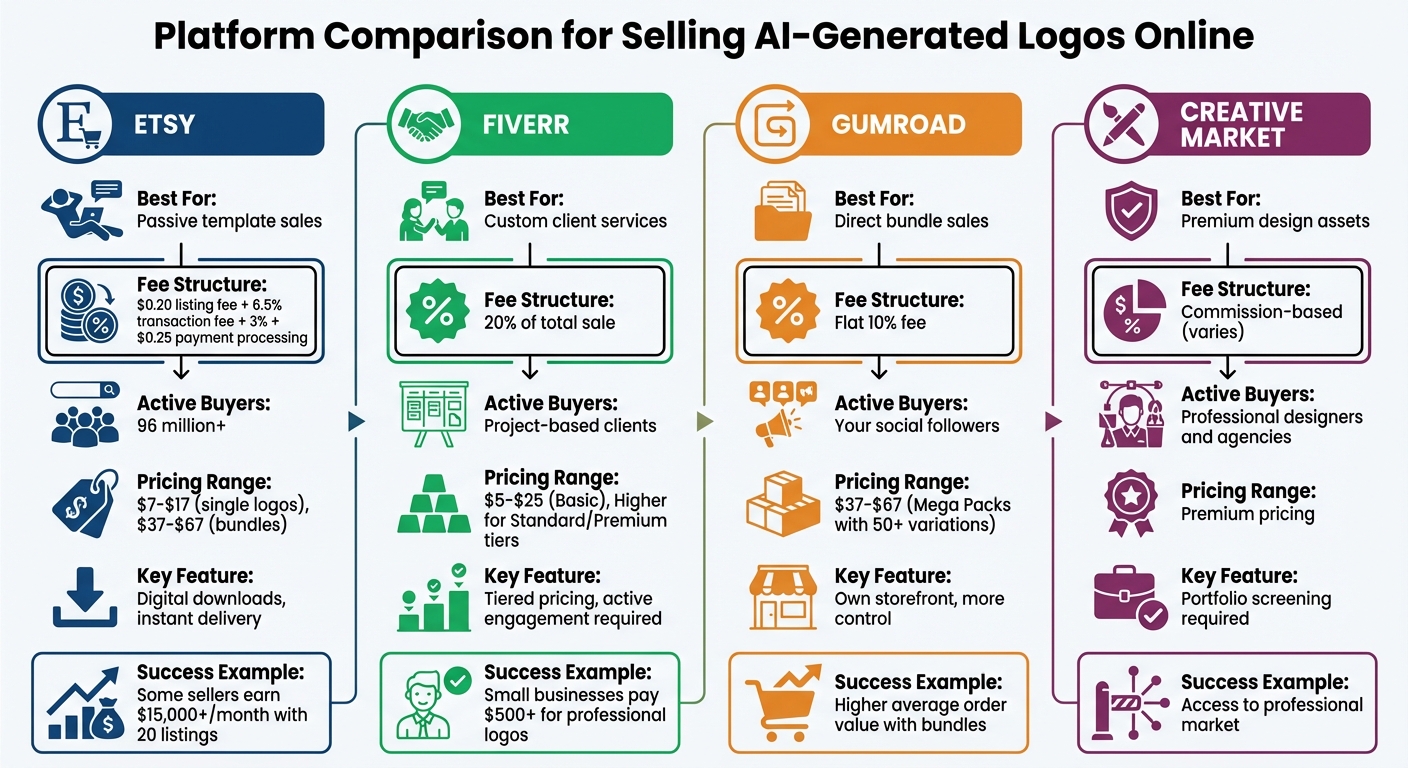
Platform Comparison for Selling AI-Generated Logos Online
Once you’ve created your AI-generated logos, picking the right platform can make all the difference in reaching your target audience and maximizing your earnings. Choose a platform that aligns with your logo style and sales approach.
Etsy: Sell Logo Templates as Digital Downloads
Etsy is a powerhouse in the digital download space, generating $5.5 billion in sales and boasting over 96 million active buyers. It’s an ideal platform for selling logo templates customers can download instantly. Here’s the cost breakdown: $0.20 per listing (active for four months), a 6.5% transaction fee, and a payment processing fee of 3% + $0.25 per transaction.
Setting up a shop is straightforward. Etsy guides you through account and identity verification, and you’ll connect your bank account using Plaid (for U.S. sellers) or Payoneer (for sellers in regions like India, Japan, or South Korea). When listing your logos, upload files in formats like PNG, JPG, or PDF for instant delivery. Many sellers also include a PDF with a link to a Canva template, enabling buyers to easily customize their designs.
Some Etsy sellers earn over $15,000 a month with just 20 listings. To boost your chances of success, optimize your listings with tags (e.g., "2026") and showcase your logos with high-quality mockups, such as business cards or iPads. Pricing typically ranges from $7–$17 for single logos, while bundles or branding kits can fetch $37–$67. Including a "How to Use" PDF with every download can significantly reduce refund requests – by as much as 90%.
If you’re looking to offer custom designs, consider a more interactive platform.
Fiverr: Offer Custom Logo Services
Fiverr is the go-to platform for sellers offering personalized logo services. Unlike Etsy’s passive model, Fiverr requires active engagement with clients to deliver tailored designs. The platform charges a 20% transaction fee on your total sale amount.
To get started, create a seller profile and set up gigs with tiered pricing. For example:
- Basic: A single logo concept, priced at $5–$25.
- Standard: A logo with vector files included.
- Premium: A full branding suite with multiple revisions and brand guidelines.
This tiered structure allows you to cater to a range of budgets while upselling extras like expedited delivery or access to source files. As one Etsy marketer put it:
"A good logo is more than just a pretty design; it’s the face of their brand, and they’re willing to invest in quality."
Clear communication and fast turnaround times are essential for success on Fiverr. With 75% of consumers identifying the logo as the most memorable part of a brand, small businesses are often willing to pay $500 or more for professional work. Use client feedback to refine your AI-generated concepts and deliver polished results.
Prefer to manage your own storefront? There are other options for that.
Gumroad and Creative Market: Sell Logo Bundles Directly
Gumroad and Creative Market let you create your own storefront, giving you more control over your sales while reducing reliance on marketplace traffic. Gumroad charges a flat 10% fee on sales, making it a simple option for beginners. Creative Market, on the other hand, caters to professional designers and agencies seeking premium assets. However, it requires portfolio screening before allowing you to join.
These platforms work particularly well for selling themed logo collections or "Mega Packs" with 50+ variations in a specific style, typically priced at $37–$67. Bundles like these can significantly increase your average order value compared to selling individual logos.
To drive traffic to your storefronts, focus on visual platforms like Instagram and Pinterest rather than relying solely on internal search algorithms. Protect your work by watermarking preview images and including clear "Terms of Use" in your listings. Remember, you retain copyright of your designs unless explicitly transferred through a contract.
| Platform | Best For | Fee Structure | Active Buyers |
|---|---|---|---|
| Etsy | Passive template sales | $0.20 listing fee + 6.5% transaction fee | 96 million+ |
| Fiverr | Custom client services | 20% of total sale | Project-based clients |
| Gumroad | Direct bundle sales | Flat 10% fee | Your social followers |
| Creative Market | Premium design assets | Commission-based (varies) | Professional designers |
Each platform offers unique opportunities, so choose the one that fits your style and business model.
sbb-itb-d544328
How to Price Your AI-Generated Logos
When deciding how to price your AI-generated logos, aim for a balance that appeals to buyers while ensuring profitability. Traditional logo design often costs anywhere from $300 to $2,500, but AI-generated logos can be offered at much lower prices, starting around $30. Small businesses frequently spend over $500 for professional logos, giving you flexibility to position your pricing across this wide range.
Consider charging extra for manual tweaks, such as custom fonts, borders, or mockups. Similarly, higher rates are justified for offering expanded usage rights, like Extended Licenses for resale or broad commercial use. Don’t forget to account for platform fees – Etsy takes 6.5%, while Fiverr charges 20%.
Pricing Models Comparison
Your pricing approach should align with your business model and the audience you’re targeting. Here are some common methods to consider:
- Fixed project fee: This approach provides clients with a clear budget and works well for selling bundles or templates. However, make sure to set strict limits on revisions to avoid losing money.
- Value-based pricing: This method allows you to charge more when creating logos for established businesses, as their logo’s value could directly impact their revenue.
- Hourly rate: Charging by the hour ensures you’re compensated for all refinement work, though many clients prefer flat fees for digital goods.
- Bundles and mega packs: Bundling logos can boost perceived value. For instance, offering 50 logo variations for $47 could bring in more revenue than selling them individually for $7 each.
| Model | Advantages | Disadvantages |
|---|---|---|
| Fixed Project Fee | Predictable costs for clients | Risk of scope creep without revision limits |
| Value-Based Pricing | Potential for higher earnings | Requires strong negotiation skills |
| Hourly Rate | Ensures payment for all work | May be less appealing to clients |
| Bundles/Mega Packs | Increases perceived value; passive income potential | Requires significant upfront work |
Choosing the right model depends on your audience, platform, and the quality of your designs.
Monthly Income Examples
Your monthly earnings will vary based on how many logos you sell, your pricing, and platform fees. Here’s a breakdown of potential income:
| Sales Volume | Price per Unit | Monthly Gross | Net Profit (After Fees 10–20%) |
|---|---|---|---|
| 30 (Single Templates) | $15 | $450 | $360–$405 |
| 10 (Bundles) | $50 | $500 | $400–$450 |
| 60 | $25 | $1,500 | $1,200–$1,350 |
| 100 | $40 | $4,000 | $3,200–$3,600 |
To start, consider pricing single templates between $10 and $15, and bundles between $37 and $67. Adjust your rates based on customer feedback and sales performance. Offering multiple file formats, such as transparent PNGs and vector files (SVG/EPS), as well as mockups, can help justify higher prices.
How to Market Your Logos and Get Sales
Promoting your AI-generated logos effectively means using a mix of platforms, communities, and a central portfolio to reach potential buyers. The goal is to showcase your work where people are already searching for design ideas and services. Here’s how you can make your logos stand out and attract customers.
Use Instagram and Pinterest to Showcase Your Work
Instagram and Pinterest are perfect for displaying visual content. Instead of sharing plain images, present your logos in mockups – on business cards, storefronts, packaging, or social media templates. This approach helps potential clients imagine how the designs could work in real-life scenarios. In fact, 75% of clients are more likely to approve a design when they see it in a practical context.
On Instagram, take advantage of Reels and TikTok by posting engaging process videos. Show how you refine AI-generated logos or highlight dramatic before-and-after transformations. Tools like Flick (starting at around $11/month) can help you find the right hashtags and captions to increase your reach.
For Pinterest, focus on creating high-quality pins that link directly to your Etsy shop or Fiverr profile. Since Pinterest acts as a long-term search engine, these pins can continue driving traffic well after they’re posted. To stay consistent, consider using scheduling tools like Buffer, which offers free management for up to three channels or charges $5 per month for more options.
Join Facebook Groups and Design Communities
Facebook Groups are a great way to connect with small business owners who need affordable and fast logo services. Look for groups that cater to entrepreneurs, startups, or local businesses. When promoting your services, avoid aggressive selling. Instead, focus on the value you provide, such as quick delivery and competitive pricing compared to traditional design agencies.
For instance, you could share something like: "Hi everyone! I specialize in creating professional logos for small businesses at budget-friendly prices. My designs start at $30, and I offer 24-hour delivery." Always check the group rules before posting, and engage genuinely by commenting on others’ posts or sharing helpful design tips.
Expand your reach on LinkedIn for B2B opportunities. Target startups or new business owners who might not have in-house designers. Use LinkedIn’s search tools to find companies in your niche, and send personalized connection requests. Highlight how your logos can help their brand stand out. LinkedIn is particularly effective for connecting with other businesses and securing larger projects.
Build a Simple Portfolio Website
A portfolio website acts as a central hub for your work, tying together all your marketing efforts. Use platforms like Carrd or Canva to create a professional site that showcases your best logos. Include a variety of designs across industries – such as tech, fashion, food, and retail – to demonstrate your range of skills.
Add testimonials and a brief "About" section to build credibility. Use high-quality mockups to show how your designs look on business cards, social media banners, or product packaging. Make it easy for visitors to purchase by including direct links to your Etsy shop, Fiverr profile, or Gumroad store. To improve search visibility, use relevant keywords like "custom logo design" and "affordable logo design" in your site’s meta descriptions.
Start Selling AI-Generated Logos
Ready to turn your designs into a thriving business? With tools like Midjourney v7, DALL-E 4, or Canva AI, you can create sleek, professional logos in just minutes. Add a personal touch by incorporating custom fonts or borders, then upscale your designs to 4K or 8K resolution for print-ready quality.
When it comes to selling, pick platforms that align with your goals. For digital downloads, Etsy is a solid choice, while Fiverr is ideal for offering custom logo services. Want more control? Set up your own online store using Shopify or Ecwid – or even combine all three for maximum exposure.
Pricing is key. Consider charging $7–$17 for single logos and $37–$67 for bundles or branding kits. Since you’re selling digital products, your profit margins can exceed 90%, with no inventory or shipping hassles.
To market your logos effectively, focus on visually-driven platforms like Instagram, Pinterest, and Facebook groups. Build a portfolio website to showcase your work and stay active by updating your listings regularly – adding a new one every 48 hours can help boost visibility.
The market for digital artwork is growing fast, expected to hit $13.84 billion by 2032, so there’s plenty of opportunity for new sellers. Ready to dive in? Start small: pick one platform, create five logos, and adjust your strategy based on feedback. For more ideas, check out Earn with AI Club.
FAQs
What are the best ways to make your AI-generated logos stand out in a competitive market?
Creating logos with AI can be a powerful tool, but to truly shine, you need to focus on crafting designs that are high-quality and tailored to specific industries or niches. A consistent style or theme not only builds recognition but also helps you connect with your target audience. Pay attention to the details – clean lines, well-balanced layouts, and color palettes that align with your clients’ preferences can make a huge difference.
Marketing your work is just as crucial as designing it. Platforms like Etsy or Creative Market are great for showcasing your logos. Make sure your listings are optimized with relevant keywords and descriptions that grab attention. Beyond that, promote your designs on social media, create a polished professional website, or even offer branding packages to attract a broader range of clients. Keeping your portfolio updated and incorporating feedback from clients will also help you stay relevant and improve your reputation.
To stand out even more, think about offering customizable options or logos designed for specific niches. This approach caters to unique needs and sets your work apart from more generic AI-generated designs. By combining quality designs with strategic marketing and a focus on client needs, you can carve out a space for yourself in a competitive market.
What’s the best way to price AI-generated logos for maximum profit?
To price AI-generated logos effectively and make the most of your efforts, focus on a value-based pricing approach while keeping an eye on the competition. Start by researching what logos sell for on popular platforms like Etsy or Creative Market. Pay attention to factors like how much effort goes into creating the design, its originality, and any licensing options you plan to include. Prices can range anywhere from $50 for simpler designs to several hundred dollars for more detailed or customized work.
Another way to cater to a broader audience is by offering tiered pricing options. For instance, you can charge a premium for exclusive rights or personalized adjustments, while keeping pre-made designs more budget-friendly. By knowing your audience and highlighting the value your logos bring, you can set prices that not only attract buyers but also boost your overall earnings.
What are the best ways to market AI-generated logos on social media?
To promote your AI-generated logos on social media, focus on crafting posts that grab attention and highlight your designs. Platforms like Instagram, Facebook, and X (formerly Twitter) are ideal for sharing high-quality visuals of your logos. Pair these images with relevant hashtags to connect with your audience and expand your reach. Engaging with design communities through comments, group participation, and direct interactions can also help you establish trust and attract buyers.
Staying consistent is crucial – post regularly and use features like Instagram Stories or Reels to boost your visibility. Make it easy for followers to explore and purchase your work by including a link to your portfolio or online store in your profile bio.


