How to Build a Digital Product Using ChatGPT
ChatGPT simplifies creating digital products, letting you go from idea to launch in as little as 24–48 hours. Whether you’re crafting a course, eBook, or templates, you don’t need technical skills or a large audience – just a clear niche and the right tools. Here’s how to get started:
- Pick a niche: Focus on solving specific problems for a target audience. Use ChatGPT to brainstorm ideas and validate demand with market research.
- Plan your product: Outline content with ChatGPT’s help, ensuring a logical structure. Choose a format (e.g., eBook, course) that fits your audience’s needs.
- Draft content: Use ChatGPT to write initial drafts, then refine with your expertise for a personal touch.
- Design and package: Tools like Canva can help create professional visuals. ChatGPT can suggest layouts, color schemes, and sales copy.
- Launch and market: Leverage ChatGPT to write sales pages, emails, and social media posts. Gather feedback to improve and expand your product.
Examples show creators earning thousands by combining ChatGPT’s efficiency with targeted product ideas. Start small – like a checklist or guide – and scale from there. With minimal resources, you can turn ideas into income quickly.
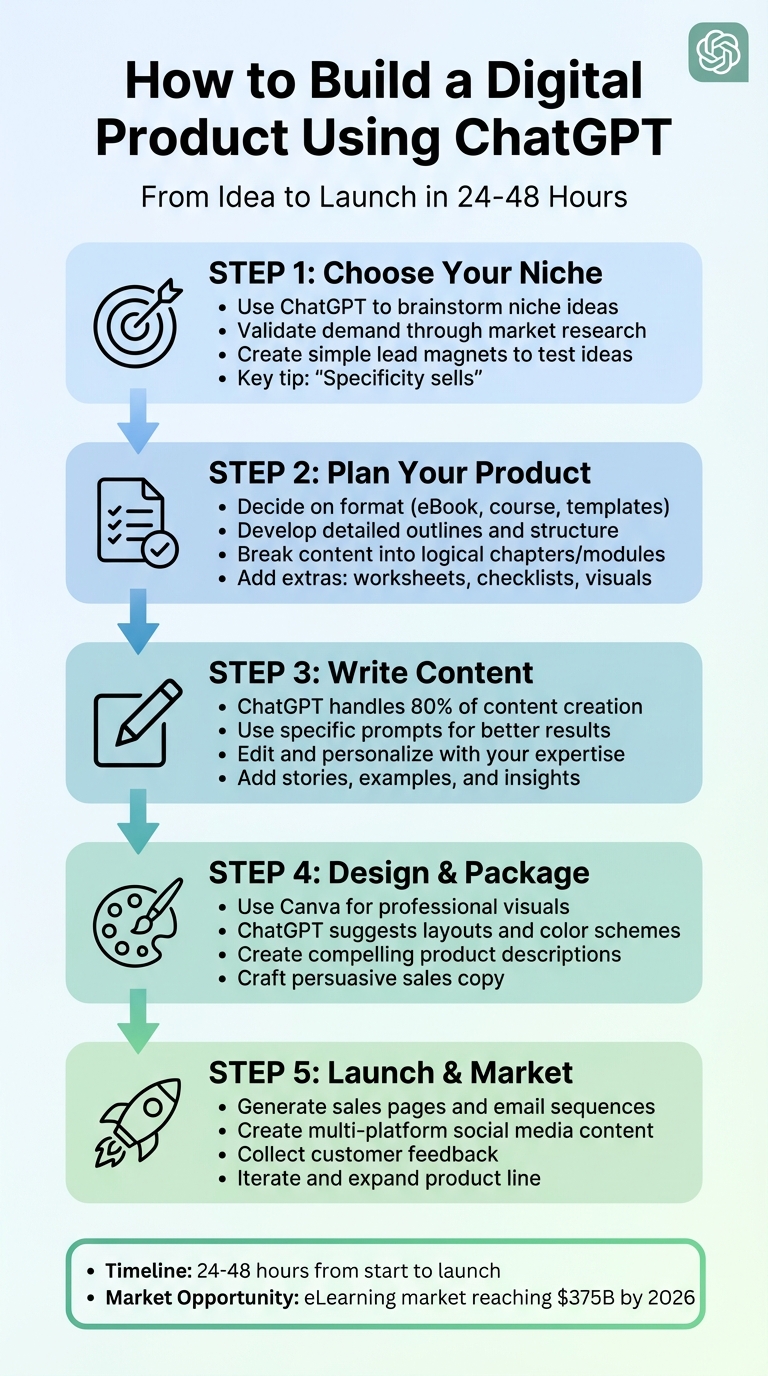
5-Step Process to Build a Digital Product with ChatGPT
How To Actually Create Your First Digital Product Using ChatGPT & Canva
sbb-itb-d544328
Step 1: Choose Your Niche and Confirm Market Demand
Choosing the right niche is all about matching your expertise with a specific problem that potential customers need solved. For instance, while a general topic like "fitness" might seem appealing, narrowing it down to something like "strength training for busy professionals" helps you target a clear audience with defined needs.
One common mistake new creators make is skipping validation. Imagine spending weeks creating a product only to find out no one wants it. To avoid this, start by identifying problems people are already paying to solve. Tools like ChatGPT can help you brainstorm and refine ideas before committing to a direction. Let’s break it down.
Use ChatGPT to Generate Niche Ideas
Begin by sharing your background and skills with ChatGPT. For example, if you’re a graphic designer or a busy parent, ask it for digital product ideas tailored to your expertise. ChatGPT is a fantastic tool for overcoming creative blocks and honing in on specific niches.
It can even help you refine broad ideas into focused ones. For instance, instead of sticking with "time management", you might uncover a more targeted niche like "time management systems for neurodivergent entrepreneurs". You can also use it to explore current trends, ensuring your skills align with what the market is looking for.
"Specificity sells." – The Pinnergrammer
Once you’ve landed on a few niche ideas, the next step is to validate them with some market research.
Confirm Product Demand Through Market Research
After generating potential niche ideas, it’s time to ensure there’s real demand for them. ChatGPT can assist by analyzing market gaps. For example, you can ask it, “What are the top 10 complaints people have about existing meal prep guides?” Using data from Amazon reviews, Reddit threads, or Facebook groups can help you pinpoint what’s missing.
Another way to validate demand is by having ChatGPT create surveys or develop user personas. For instance, you might prompt it with, “Create a persona for a 28-year-old freelance photographer managing irregular income. What are their biggest challenges?”. This exercise can clarify the pain points your product should address.
To test your niche idea quickly, create a simple lead magnet, like a one-page checklist or worksheet, and see if people download it. If they do, you’re on the right track. If not, it might be time to pivot. You can even use ChatGPT to predict potential user feedback on your product.
Step 2: Create an Outline and Plan Your Digital Product
Once you’ve validated your niche, it’s time to map out the structure of your digital product. A well-thought-out outline ensures your content flows logically and communicates clearly. This step takes your niche idea and transforms it into a structured, actionable product. Tools like ChatGPT can help you organize rough ideas into polished plans, whether you’re creating an eBook, an online course, or a collection of templates.
Decide on Product Ideas and Formats
Choosing the right format is key – it should match both your audience’s needs and the complexity of the problem you’re solving. For straightforward solutions, something like a checklist might be enough. For more in-depth topics, an online course or a detailed guide may be more appropriate.
You can even use ChatGPT to brainstorm ideas. For example, you might prompt it with: "Act as a product strategist. Recommend the best digital product format for helping freelancers manage their time effectively." The AI might suggest a productivity planner with time-blocking templates or a video course on advanced time management techniques.
"ChatGPT isn’t just a writing assistant – it’s a digital product creation machine." – reviewraccoon
Once you’ve chosen your format, it’s time to create a detailed outline that ensures every part of your product serves a clear purpose.
Develop Detailed Product Outlines
Break your product into a clear and logical structure. For an eBook, draft chapters and subheadings. For a course, organize the material into modules and lessons. If you’re creating templates, define the individual sections or worksheets.
Take an iterative approach to refine your outline. Start broadly by asking ChatGPT for a general structure, like: "Create a 5-chapter outline for an eBook on strength training for beginners." Then, expand on each section: "Provide detailed subheadings and key points for Chapter 2 on nutrition basics."
Adding extras like visuals, worksheets, or checklists can enhance your product’s appeal. For instance, a "Food Truck Business Plan Template" that included tools like location analysis worksheets, menu costing calculators, and marketing schedules sold for $97 to $197.
Make sure your outline flows naturally, starting with foundational concepts and building toward more advanced ideas. This way, your audience can follow along easily and get the most from your product.
Step 3: Write and Edit Your Product Content
With your outline in hand, it’s time to transform that structure into engaging, polished content. While ChatGPT can quickly generate a strong first draft, the real magic happens when you refine it with your expertise and personal touch.
Write Content Using ChatGPT
Start by using ChatGPT to create initial drafts based on your detailed outline. Break your writing into manageable chunks – focus on one chapter, lesson, or module at a time. This step-by-step approach helps keep the AI on track and ensures better results.
Give the AI clear and specific prompts. For example, you might say, "Write a 300-word section on meal prep basics for busy professionals looking to eat healthier." The more context you provide about your audience and goals, the closer the draft will align with your vision. Adjust your prompts depending on the content type – ask for actionable steps in a course module, emotional appeal in marketing copy, or structured layouts for templates.
To maintain consistency in tone and style, you can upload writing samples or use ChatGPT’s Projects feature to establish a custom brand voice. This ensures the AI-generated content feels cohesive and aligned with your personal or business identity.
Once the draft is complete, it’s time to shift gears and focus on refining and personalizing the content.
Edit and Improve AI-Generated Content
This is where your expertise shines. Take the AI draft and enrich it with your own insights, stories, and case studies. Adding personal experiences or specific examples not only enhances the content but also makes it more relatable and meaningful to your audience.
Use precise editing commands to fine-tune the output. For instance, you might say, "Make this 20% shorter and add a conversational tone," or "Rewrite this paragraph to feel more engaging and humorous." If you’re unsure about the best approach, ask for multiple versions – one concise, another more detailed – and choose the one that best fits your needs.
As you edit, pay close attention to inclusivity and emotional resonance. AI can sometimes produce content that feels overly mechanical or unintentionally alienating. Ask yourself: Does this sound like a real person? Would my audience feel seen and understood? Does this content fit into their lives and solve their problems?
"GPT is an accelerant, not a substitute. The flywheel works only if you refine the outputs, interpret context, and understand your audience deeply." – Time Money Code
Think of AI as your creative partner – it helps you work faster, but it’s your judgment and expertise that bring the content to life. The aim is to amplify your voice, not replace it. With your drafts polished and infused with your unique perspective, you’ll be ready to move on to designing and packaging your product for maximum impact.
Step 4: Design and Package Your Product
Creating a digital product that stands out requires more than just great content – it needs a professional design and packaging that grabs attention and conveys quality. Once your content is finalized, the next step is to transform it into a polished product that customers will want to buy. A thoughtful design can elevate your work, making it more appealing and marketable. Tools like ChatGPT can even assist in shaping your brand identity and crafting persuasive sales materials.
Now, let’s look at how to package your product professionally using the right design tools.
Choose the Right Design Tools
For professional visuals, Canva is a fantastic option. It’s user-friendly and versatile, allowing you to format eBooks, create course slides, design checklists, or even develop social media graphics to promote your product.
Before diving into Canva, you can use ChatGPT to brainstorm design ideas. For instance, ask: "What visual elements should I include in a 30-page meal planning guide for busy parents? Suggest a color palette and layout ideas." ChatGPT can suggest fonts, color schemes, or even page layouts. To keep your design cohesive, stick to one or two fonts and a simple color palette for a polished, professional appearance.
For more complex layouts, tools like Adobe InDesign offer advanced capabilities. If you need custom visuals, try using DALL-E alongside ChatGPT. For example, you could prompt: "Create a minimalist icon of a calendar for a productivity planner," and then refine the design by tweaking colors or simplifying the background. Once you have the basics, Canva can help you adjust text placement, fine-tune layouts, and add those finishing touches.
Crafting Product Descriptions and Sales Copy
With your design in place, it’s time to focus on writing sales copy that resonates with your audience. This is where ChatGPT can shine. It can help you create persuasive descriptions that highlight your product’s benefits, connect emotionally with your audience, and encourage them to take action. Start with a prompt like: "Act as a brand marketing expert. Write a product description for a $47 email marketing template bundle aimed at small business owners. Highlight the benefits, explain who it’s for, and include a strong call to action."
As the Codecademy Team puts it:
"Product descriptions do much more than merely describe: they sell. They provide essential information, yes, but they also paint a picture, set a mood, and create an emotional resonance."
You can also use ChatGPT to create variations of your copy. For example, ask for versions that emphasize urgency, value, or transformation. Need taglines for ads or social media? A prompt like "Generate three taglines that highlight convenience and professionalism for a business plan template" can give you plenty of ideas. You can even go a step further and have ChatGPT draft a one-week social media content calendar with post ideas tailored to your product launch.
Finally, make sure your copy is inclusive and emotionally engaging. ChatGPT can help refine your language to ensure it feels relatable and appealing to a broader audience. With a polished design and compelling sales copy in hand, you’ll be ready to launch your product and start connecting with customers.
Step 5: Launch and Market Your Product
Now that your product is ready to go, it’s time to introduce it to your audience. With ChatGPT, you can craft launch emails, social media posts, and even sales pages – no need to hire a full-fledged marketing team.
Create a Launch Strategy with ChatGPT
Once your product is polished, the focus shifts to connecting with your audience. ChatGPT can help you generate content for multiple platforms quickly and effectively. For example, you can use it to write sales pages that highlight the benefits of your product, outline who it’s for, and include a compelling call to action. Try a prompt like: "Write a sales page for a digital product that teaches beginners how to [result]. Emphasize the benefits, target audience, contents, and add a strong call to action."
This approach worked for a creator named Awalynth, who in November 2025 completed a 48-hour challenge to build and launch a digital product. By using ChatGPT to write sales copy and promotional posts for platforms like Twitter and Facebook, Awalynth secured two sales right after sharing the product with a small audience.
ChatGPT’s versatility doesn’t stop there. It can draft email sequences, suggest 50 different subject lines, or write Instagram captions with trending hashtags. You can even ask it to create 15-second video scripts for TikTok or Reels, offering behind-the-scenes peeks at your product creation process. For instance, in September 2025, the digital creator "reviewraccoon" used ChatGPT to launch a "Tech Professional Resume Pack." This pack, priced at $37, included resume templates and cover letters optimized with ATS-friendly keywords generated by ChatGPT. The result? Over 300 sales, proving how AI can simplify multi-channel content creation and drive successful product launches.
Collect Feedback and Grow Your Product
Once your product is out in the world, the work doesn’t stop. Use customer feedback to improve and expand your offering. ChatGPT can help you analyze feedback, organize surveys, and even interpret customer reviews to suggest updates or enhancements. This ongoing process is vital for creating improved versions of your product or developing upsell opportunities, such as bonus templates, advanced features, or related products.
ChatGPT can also assist in identifying growth opportunities. For example, it can create marketing audit templates to evaluate your strengths, weaknesses, and untapped channels. If customers frequently request a specific feature or format, ChatGPT can help you brainstorm ways to turn those insights into a new product. Staying responsive to your audience and leveraging real feedback ensures your product continues to evolve and meet their needs.
Conclusion
Creating a digital product with ChatGPT is simpler than you might think. You don’t need technical skills, a massive audience, or months of preparation. This guide has walked you through identifying a profitable niche, structuring your product, efficiently drafting content, designing polished packaging, and launching with confidence. With ChatGPT handling up to 80% of the content creation process, you can focus on fine-tuning your final product.
The potential for success in this space is huge. The global eLearning market is expected to hit $375 billion by 2026. Take, for example, an independent creator in September 2025 who shared their story of earning $47,000 in just six months by creating 15 digital products with ChatGPT. Individual products like a "Social Media Marketing for Local Businesses" course generated $8,000, while a "30-Day Keto Meal Plan" brought in $12,000. These products were priced between $27 and $497.
"You don’t fail because the product isn’t good. You fail because you don’t launch at all. Perfection is the enemy."
– Awalynth, Digital Creator
The process doesn’t have to be overwhelming. Start small – a simple checklist, a 20–30 page guide, or a template pack is a great first step. Use ChatGPT to draft your content and outline, refine your tone, design with tools like Canva, and upload your product to platforms like Gumroad or Stan Store. This entire process can take as little as 24–48 hours.
Once you launch, focus on collecting customer feedback and iterating. Use that feedback to improve your product and brainstorm complementary offerings. ChatGPT can assist in refining your ideas and expanding your product line. Your first digital product is just the starting point of a scalable income stream, offering recurring revenue without the hassle of inventory.
FAQs
How can I check if people will want to buy my digital product?
To ensure there’s a real demand for your digital product, it’s crucial to validate your idea before diving in and investing significant time or resources. Start by researching your target audience to get a clear picture of their needs, challenges, and preferences. Look at your own skills, hobbies, or interests and think about problems you or others commonly face that your product could address. Whether it’s an online course, an eBook, or templates, focus on solutions that provide value.
Tools like ChatGPT can be helpful for brainstorming ideas, refining your concepts, or exploring trending topics within your niche. Additionally, gather insights through surveys, study competitors, and analyze popular digital products in your field to measure interest. Taking these steps to validate your idea will increase the likelihood of creating something that truly connects with your audience and meets market demand.
What’s the best way to use ChatGPT for drafting and refining content?
To get the most out of ChatGPT for drafting and refining content, start by giving clear, detailed prompts. Outline your goals upfront – whether you need a structured outline, a list of ideas, or a fully developed draft tailored to your audience. This helps ensure the initial output aligns with what you’re aiming for.
Once ChatGPT generates a draft, take it a step further by using iterative feedback. Carefully review the content, pinpoint areas that need improvement, and guide ChatGPT with specific instructions. For example, you can ask for adjustments to the tone, clarification of certain points, or more concise explanations. The more precise your feedback, the better the revisions will be.
Think of ChatGPT as a collaborative tool. Experiment with different phrasings, styles, and angles until the content feels just right. This approach helps you create polished, high-quality material that’s ready to share or publish.
How can I use ChatGPT to successfully market and launch my digital product?
ChatGPT can be an excellent resource when it comes to marketing and launching your digital product. You can use it to craft attention-grabbing marketing content, including social media posts, email campaigns, and product descriptions that connect with your audience. Beyond content creation, it’s also a helpful brainstorming partner for promotional strategies, such as hosting webinars, running limited-time discounts, or teaming up with influencers to increase your product’s visibility.
Before you launch, ChatGPT can help you validate your product idea by analyzing market trends and spotting gaps in what competitors offer. This ensures your product aligns with customer needs. It can also be a game-changer for automating tasks like customer support. With AI-driven chatbots, you can provide instant responses to inquiries, which helps build trust and keeps potential buyers engaged.
By using ChatGPT for content creation, idea validation, and task automation, you can simplify your marketing process and set the stage for a successful product launch.